
Logitech G Pro Gaming Mouse Review
Our Logitech G Pro Gaming Mouse review takes a look at one of the company’s entry-level rodents in its Pro Series, aimed squarely at competitive PC gamers who place performance above all else. The design is more subdued than some gaming peripherals out there, but it’s also been around for a while now and doesn’t need to change.
With a focus on performance rather than looks or features, the Logitech G Pro sticks to the basics and offers quality gaming performance at an affordable price. Few PC gaming peripherals are as consistent as the Logitech G Pro, and with the recent addition of the Hero 25K optical sensor, it’s even more competitive with max DPI that reaches 25,600.
Design
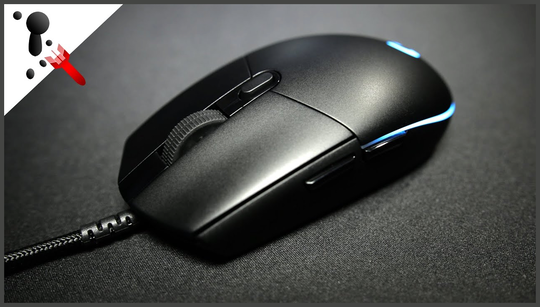
The Logitech G Pro Gaming mouse’s look won’t turn any heads, but it also won’t turn any stomachs either. It’s a relatively normal-looking rodent that doesn’t stand out from the crowd in any way, with subtle RGB lighting for added personality.
Its design has remained largely unchanged over the years, with a form factor that Logitech clearly feels is near-perfect. It’s a bit on the chunky side, but it also has a nice weight to it at 85 grams, striking a balance between lightness for faster swipes and durability. It’s not the lightest mouse out there, but it doesn’t feel heavy either.
I never felt like I was getting fatigued while using the Logitech G Pro, though it’s worth noting that its lack of textured grips could be a deal-breaker for some. I didn’t notice any slippage during intense rounds of CS: GO and Valorant, but it’s easy to see how it could be an issue in more chaotic games.
The design of the Logitech G Pro is nothing special, but it feels nice to use. The two side buttons are well-positioned for easy access, and the main mouse button has a satisfying click. It’s not the quietest mouse button I’ve used, but it’s also not the noisiest either.
Features
The Logitech G Pro Gaming mouse features a respectable 3088 DPI sensor and 512KB of onboard memory, serving as a nice upgrade over its predecessor. It also features low click latency and responsive buttons, giving you the confidence to take on just about any game.
Of course, no gaming mouse is complete without a pair of side buttons, and the Logitech G Pro does not disappoint. It also features a convenient thumb rest that can be pressed for additional actions, though it’s not as versatile as some other gaming mice out there.
While the Logitech G Pro offers straight-forward gaming performance, it’s important to note that it lacks some features that are common in more expensive gaming mice. There’s no weight system, it’s not ambidextrous, and it doesn’t have any textured grips.
These omissions won’t be deal breakers for everyone, but they may be drawbacks for left-handed gamers, who are often neglected by major mouse manufacturers. The mouse is also a bit of a one-trick pony, featuring no extra thumb buttons to speak of.
Logitech G Hub provides customization for the RGB lighting strip, which adds a bit of personality to the otherwise boring design. Logitech also has its own Gaming Mouse Network, where you can earn points for in-game bonuses by using your G-series mouse.
Conclusion
The Logitech G Pro Gaming mouse is a solid choice for those looking for a competent, no-frills gaming mouse under $100. While it lacks some features that typically come with a higher price tag, its performance can stand up to the best mice in its class.
If you’re looking for a flashy gaming mouse with a ton of extra features, the Logitech G Pro isn’t for you. But if you value performance above all else, it’s a reliable choice and a safe bet if you’re looking to buy your first gaming mouse.
End