
Deep Cleaning Your Keyboard
Deep cleaning your keyboard will not only make it look brand new, but it’ll also improve the feel and performance of your keys. Over time, dirt, dust, and grime can build up inside your keyboard and affect its inner workings. This can cause keys to become unresponsive, slow down typing, and even damage the electrical circuit.
If you’re looking to keep your keyboard in tip-top shape, we recommend deep cleaning it at least a few times per year. Regular cleaning will also help prevent debris from affecting the inner workings of your keyboard. Depending on where you keep your computer, you may need to clean it more often.
While you can buy special equipment to deep clean your keyboard, you don’t need fancy tools to do the job. You can shake your keyboard upside down to remove dust and hair, or you can use canned air and a soft brush between the keys. Cleaning your keyboard requires careful cleaning and dismantling, which can be difficult if you don’t have the right tools.
This guide will outline the safest, easiest, and most affordable way to clean your keyboard.
Steps to Deep Clean Your Keyboard
Before you begin deep cleaning your keyboard, take a photo of the keyboard layout to ensure you can put the keys back in the right place. If you’re using a mechanical keyboard, you can use this as a reference for the correct switch height.
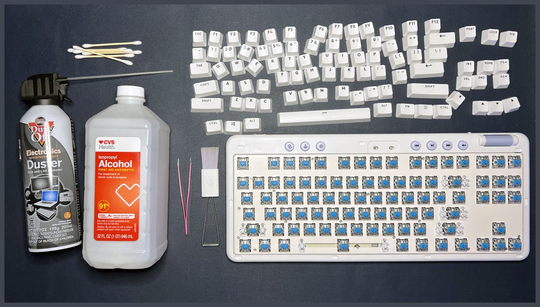
Remove the keycaps using a keycap puller or a flat tool. You can also use your fingers, but we don’t recommend this as it’s easy to lose grip and drop a key. Once the keycaps have been removed, soak them in warm water and dish soap. Shake your keyboard upside down to remove trapped dirt.
Next, clean the faceplate and switches with a brush. You can use cotton buds dipped in water or isopropyl alcohol for stubborn dirt, but be cautious with cheaper plastics.
Now it’s time to put the keycaps back on. If you have a mechanical keyboard, use the height measurements from your reference photo to ensure the keycaps are placed correctly. Scrub the keycaps with a microfiber cloth or sponge, rinse, and let them dry completely before reattaching.
Replacing the keycaps may seem like a daunting task, but if you take your time and follow the correct order, it’ll be a breeze. Keep your keyboard clean by shaking it, running a brush between the keys, and considering keyboard cleaning gadgets.
And that’s how you deep clean a keyboard. Keeping your keyboard clean will not only improve its appearance but also its performance. A clean keyboard will make your workspace more pleasant and allow for better productivity. We recommend trying to deep-clean your keyboard at least a few times a year. If you find yourself cleaning your keyboard regularly, consider using a keyboard cleaning kit or keyboard putty for regular maintenance.